> For the complete documentation index, see [llms.txt](https://help.starkbank.com/llms.txt). Markdown versions of documentation pages are available by appending `.md` to page URLs; this page is available as [Markdown](https://help.starkbank.com/cartoes-corporativos/cartoes-e-titulares/como-gerar-cartoes-virtuais-no-aplicativo.md).
# Como gerar cartões virtuais no aplicativo?
Saiba como gerar novos cartões corporativos virtuais pelo aplicativo do Stark Bank de forma simples e rápida.
### Passo a passo
1. Abra o seu aplicativo do Stark Bank e toque na opção Cartões corporativos.
2. Na tela seguinte (onde aparecem as suas transações), toque no ícone de cartão, localizado no meio do menu inferior.
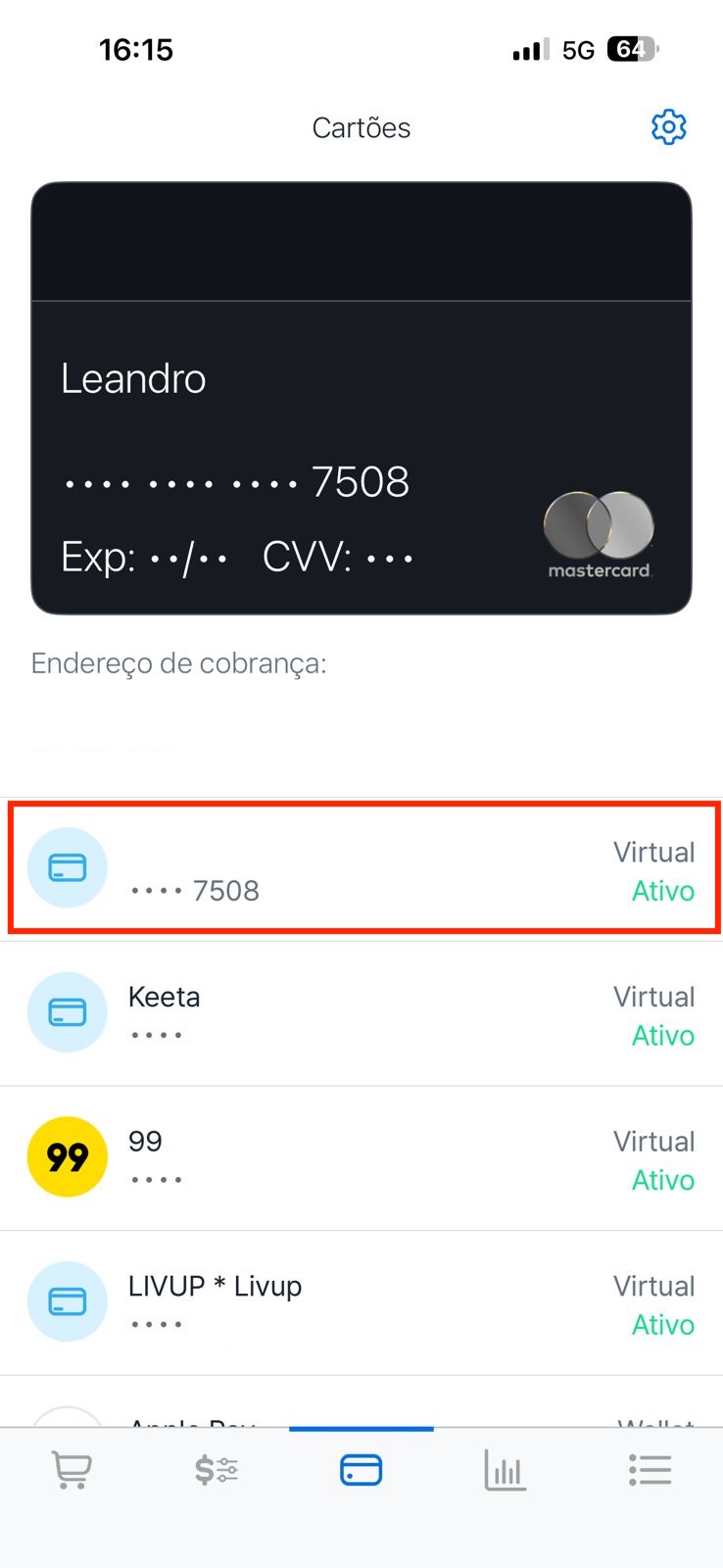
3. Nesta tela, você verá todos os seus cartões físicos e virtuais já emitidos. O seu novo cartão virtual estará sempre disponível como o primeiro da lista.
4. Basta tocar no cartão para visualizar os dados (número, validade e CVV) e utilizá-lo na sua compra.
{% hint style="success" %}
O aplicativo do Stark Bank gera novos cartões virtuais de forma dinâmica.
Assim que você utilizar o primeiro cartão da lista para uma compra, ele será tokenizado e descerá para o seu histórico de cartões. Em paralelo, um novo cartão virtual será gerado automaticamente no topo da lista, pronto para o seu próximo uso, em outro estabelecimento.
{% endhint %}
---
# Agent Instructions
This documentation is published with GitBook. GitBook is the documentation platform designed so that both humans and AI agents can read, navigate, and reason over technical content effectively. Learn more at gitbook.com.
## Querying This Documentation
If you need additional information that is not directly available in this page, you can query the documentation by asking a question.
Perform an HTTP GET request on the following URL with the `ask` and `goal` query parameters:
```
GET https://help.starkbank.com/cartoes-corporativos/cartoes-e-titulares/como-gerar-cartoes-virtuais-no-aplicativo.md?ask=&goal=
```
`ask` is the immediate question: it should be specific, self-contained, and written in natural language.
`goal` is what the user is ultimately trying to achieve, the reason they need the answer. Sharing it helps GitBook give you a better, more relevant answer. A goal is most helpful when it describes the outcome the user wants rather than restating the question. For example, with `ask=how do I create an API token`, a goal like `automate deployments from our CI pipeline` lets GitBook tailor the answer to that use case.
The response will contain a direct answer to the question and relevant excerpts and sources from the documentation.
Use this mechanism when the answer is not explicitly present in the current page, you need clarification or additional context, or you want to retrieve related documentation sections.